
Custom App for Coffee Chains
A coffee chain runs on a system, not an app.
The app your customers use. The app your staff use. The office behind both, and the website in front. We build the whole thing around your branches, and your chain owns it.
How it works
One system. Four screens.
Each screen is the same product, seen from a different side of the counter.
- 01
How you run
Your branches, lanes and menu, and the POS each branch runs.
- 02
Built around your branches
The customer app, the staff app, the office and the website, tested at one counter first.
- 03
Owned by your chain
Your brand, your data, your code and your customers, with a handover your team can follow.
What you get
Orders ready when they arrive
Money back in the wallet
Campaigns for one group
A chain's day
The app, the counter and the office agree.
Six moments from one chain's day. Each one is handled by the same system, so no screen has to be told what another one knows.
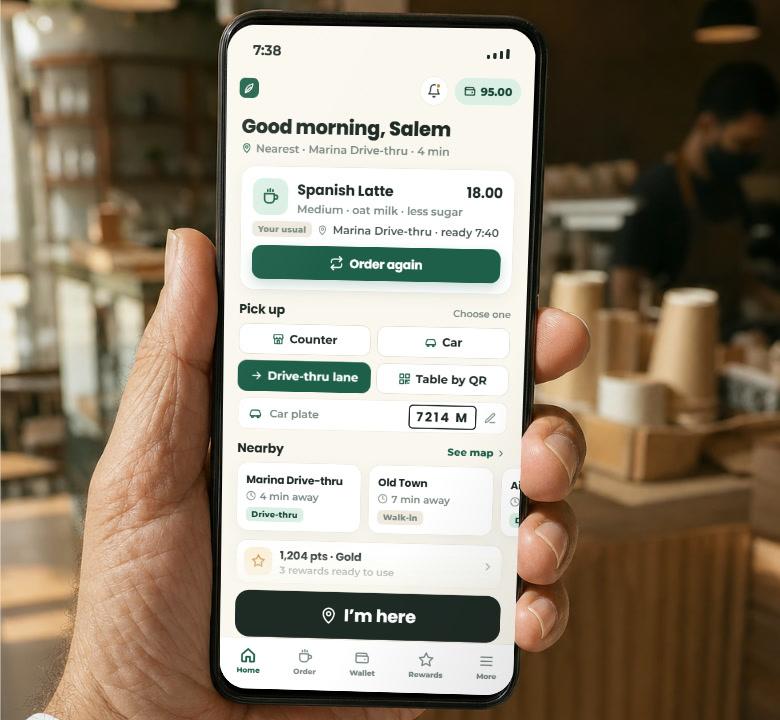
07:20 Order ahead for the lane
The drive-thru queue is the first thing a customer sees.
What we buildThey order on the way and tap “I'm here”. The lane has it ready. The counter, the car and a table by QR work the same way.
09:40 Sold out after they paid
A customer paid for a croissant you ran out of five minutes ago.
What we buildThe app offers a swap, or the money is back in their wallet right away. If a card fails, the wallet steps in and the order still goes through.
11:00 A coffee for a friend
Someone wants to buy a colleague a coffee at another branch.
What we buildThey send a link. The friend picks the branch and shows a code. Points can be sent the same way, or turned into drinks, discounts or credit.
13:30 A menu of three buttons
Sixty items are too many for some customers, and for a car window.
What we buildBig text, three buttons, the usual in one tap. Or say “my usual, but bigger”: the assistant builds the order and asks before paying. Arabic or English.
15:00 Stock from the POS you run
The counter ran out of oat milk and head office heard the next day.
What we buildStock comes from your POS. Every phone knows in minutes, and the office suggests the purchase order before the rush.
17:00 A campaign for one group
A free pastry for anyone who hasn't visited in thirty days, three branches, Saturday.
What we buildPick the group, the branches, the time and the channel. It runs on schedule and shows what it changed.
Before we start
A few useful details.
What this solution covers
Four screens built around your branches, and owned by your chain.
- Customers order ahead for the counter, the car, the drive-thru lane or a table by QR
- A sold-out item swapped, or the money back in the wallet right away
- Points that become drinks, discounts or wallet credit, and can be sent to a friend
- A simple mode and a voice assistant for customers who don't want a menu
- Stock read from the POS you already run, with alerts before the rush
- Campaigns for one group of customers, on a schedule, by push or WhatsApp
- Head office sees every branch, a branch manager sees one, and every action is logged
What comes with it
- The customer app for iOS and Android: ordering, wallet, points, gifts and a simple mode
- The staff app: orders by lane, a sold-out toggle, stock alerts and a recipe assistant
- The web office: menu and prices per branch, roles, stock, campaigns, and questions answered from your own numbers
- The website: menu, branches, careers, the same ordering, office accounts and catering
- One branch built and tested first, then the rest, and a handover owned by your chain
What we need from you
- Your menu, branches and lanes: counter, car, drive-thru, tables
- Which POS each branch runs, and whether it can share stock
- A person who decides prices, limits and campaigns
- One branch to test in
Access & control
- Verification follows your rules: phone and name for everyone, an ID only above the limit you set.
- A failed card payment is covered by the wallet only if the customer has credit. An order never goes through unpaid.
- Refunds go to the wallet right away. Card refunds follow your bank's timing.
- The assistant builds an order and asks before paying. It never pays, refunds or changes a price on its own.
- Stock accuracy depends on your POS. We confirm what it can share before we build, through its API or a bridge for older ones.
- Your chain owns the product. Payment, messaging and map services keep their own terms.
Can the app read stock from an old POS?
Yes, through the POS's API where it has one, or a bridge that reads what older ones export. We confirm what your POS can share before we build, so the stock in the app matches the counter.
What happens when a card is declined or an item is sold out after paying?
If the card fails, the wallet pays when it has credit, so the order goes through. A sold-out item is swapped or refunded to the wallet right away, and every payment keeps its receipt.
Do we still need a website if we have the app?
The website is the same system in front: menu, branches, careers, the same ordering, office accounts and catering. Customers who don't install apps can still order, and search engines can still find your branches.
Who owns the coffee chain app you build?
Your chain does: the brand, the data, the code and the customers. We hand it over with instructions your team can follow, built so it keeps working without us.
Start with a conversation
Let’s put it to work.
Tell us the task and the tools you use.